

Expense Claims Software
Manage employee expenses from submission to reimbursement in one structured system. Link claims to projects, enforce approval rules, and maintain clear visibility across teams, costs, and billing.
Why many Expense Claim systems fall short
Common Pain Points
- Paper-based or email-driven submissions slow everything down
- Missing receipts and incomplete claims create delays
- Approval processes lack structure and accountability
- Limited visibility into spend by project or employee
- Manual checks increase admin workload
- Difficulty enforcing expense policies consistently
Most expense processes rely on disconnected tools, making control and visibility difficult.
Expenses are often captured in one place, approved in another, and tracked manually. This leads to delays, errors, and uncertainty around actual costs. As volume increases, it becomes harder to maintain consistency and accountability across teams.
How Fusion Expense Claims supports real workflows

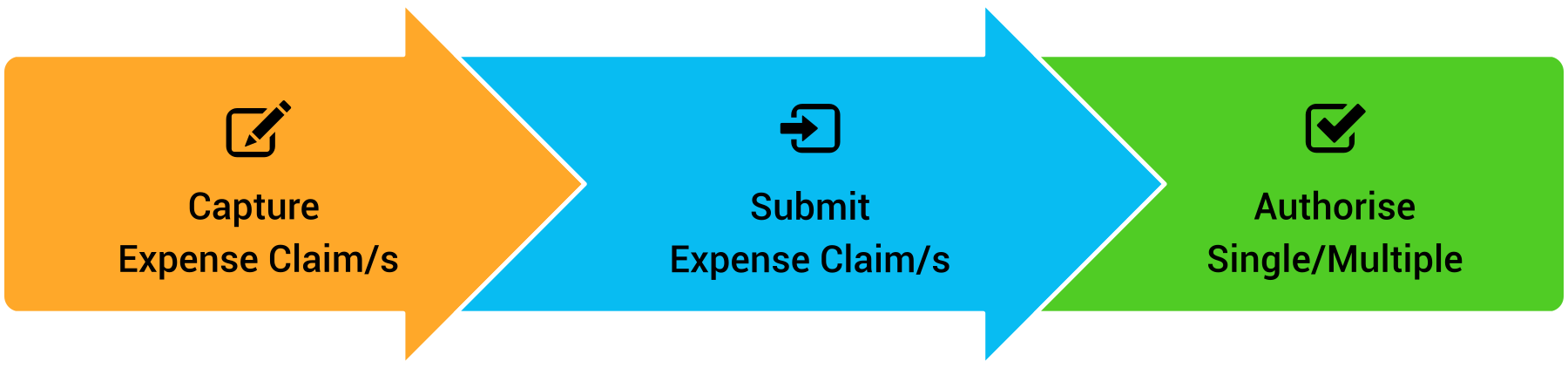
Capture and structure expense claims
Employees submit claims with the right context from the start.
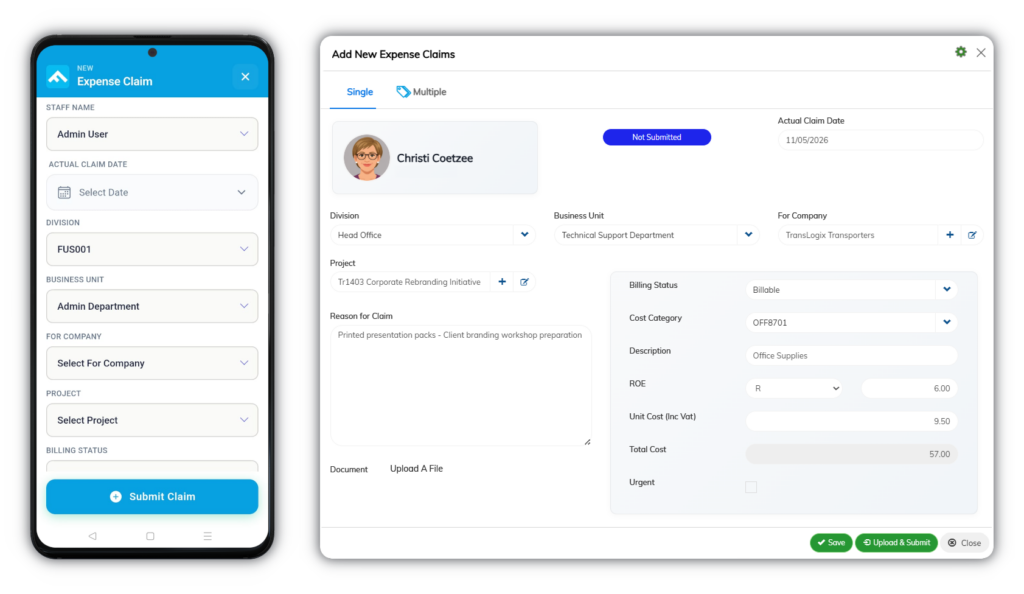
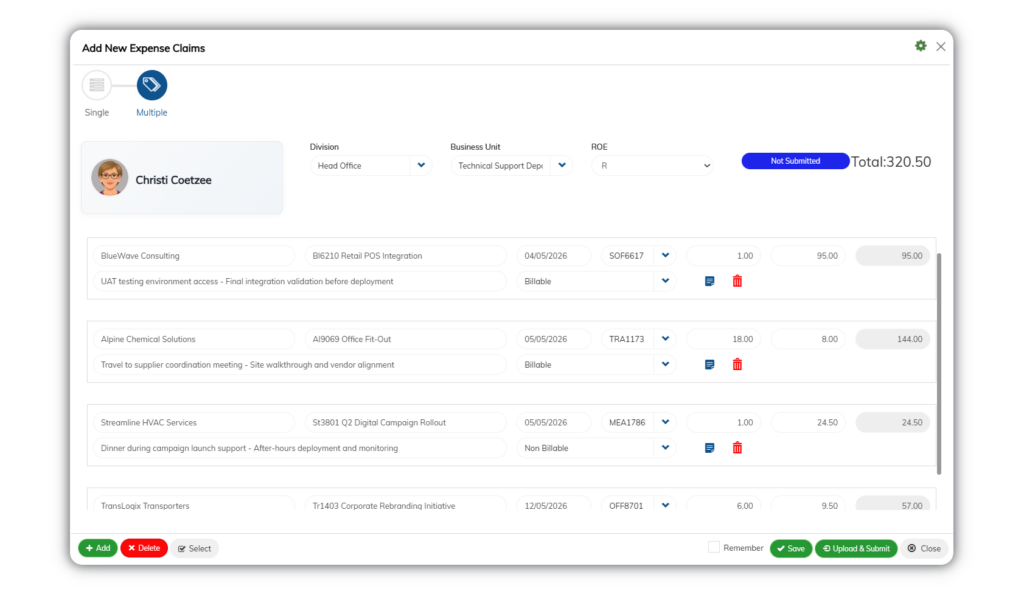
Claims can be created as single or multi-item entries, with cost categories, quantities, and supporting documents captured in one place.
How it helps
- Standardised claim capture reduces errors and rework
- Attach receipts and supporting documents during submission
- Predefined cost categories ensure consistent data entry
- Automatic calculations based on quantity and rates
Outcome: Clean, complete claims ready for approval

Route expense claims through controlled approvals
Every claim follows a defined approval path.
Approval workflows enforce accountability with up to three approvers, ensuring claims are reviewed before reimbursement.
How it helps
- Multi-level approvals ensure proper oversight
- Claims remain pending until all required approvals are complete
- Approvers receive notifications and can act quickly
- Optional email-based approval without logging in
Outcome: Faster approvals with clear accountability

Link expenses claims to projects and billing
Claims are tied directly to operational work.
Claims can be linked to clients and projects, with billing status defined to support cost recovery and reporting.
How it helps
- Link claims to projects or internal costs
- Mark expenses as billable or non-billable
- Filter projects automatically based on client selection
- Maintain accurate cost allocation across work
Outcome: Clear visibility into project costs and recoverable expenses
Core Expense Claims Capabilities
Structured control across capture, approval, and tracking
Manage the full expense lifecycle with clear rules, consistent data, and built-in accountability.
- Claim Capture & Submission
- Approval & Workflow Control
- Project & Cost Allocation
- Document & Data Management
Claim Capture & Submission
Capture complete, accurate expense data from the start.
- Create single or multi-item claims
- Capture and upload receipts from mobile or desktop
- Select predefined cost categories
- Automatic cost calculations based on quantity
- Link claims to references such as appointments
- Submit claims from anywhere without delays
*Screenshots are illustrative only, contain fictitious data, and may differ from the current interface as the system evolves.
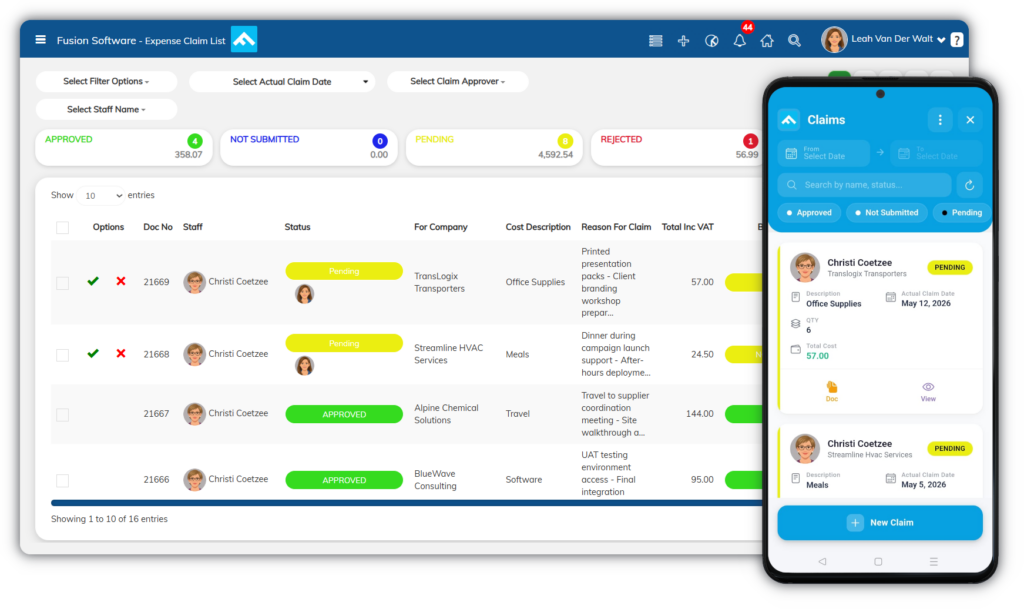
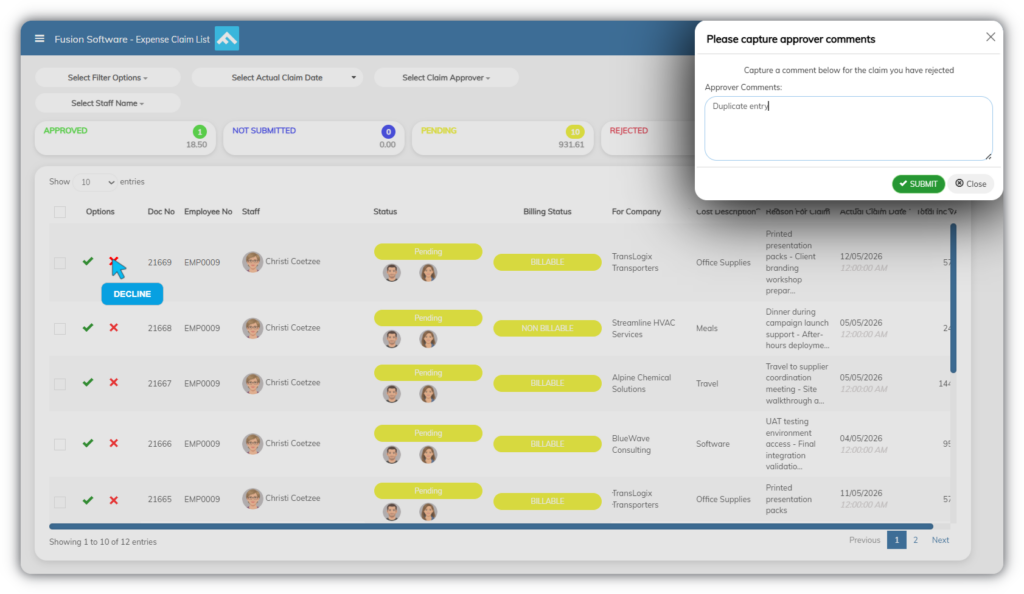
Approval & Workflow Control
Ensure every claim follows a defined approval process.
- Multi-level approval workflows (up to three levels)
- Claims remain pending until fully approved
- Role-based permissions for control and security
- Notifications for submitted and approved claims
- Optional email-based approval (Q-Link)
*Screenshots are illustrative only, contain fictitious data, and may differ from the current interface as the system evolves.

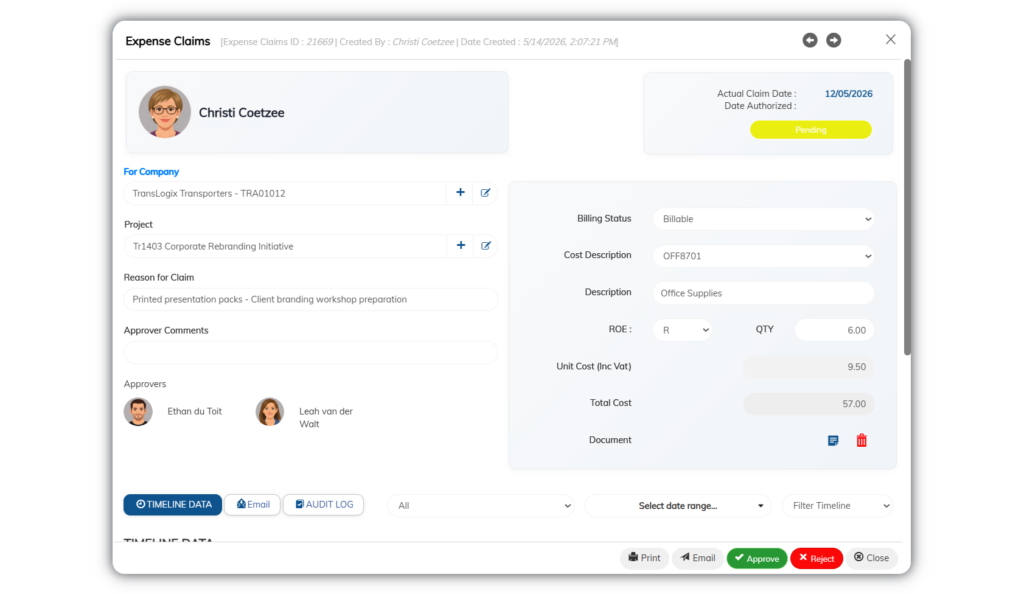
Project & Cost Allocation
Track where money is spent and how it should be treated.
- Link claims to clients and projects
- Auto-filter projects based on client selection
- Mark expenses as billable or non-billable
- Restrict cost categories to relevant expense types
*Screenshots are illustrative only, contain fictitious data, and may differ from the current interface as the system evolves.
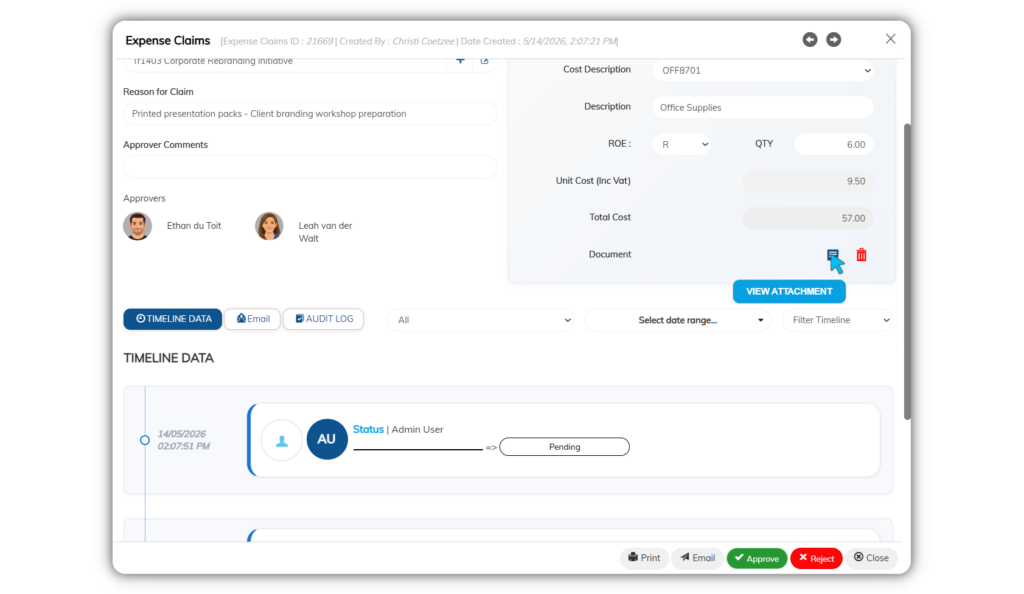
Document & Data Management
Keep all claim data structured, traceable, and easy to manage.
- Centralised storage for all claims and supporting documents
- Track status from draft through to paid
- Full audit trail of approvals and changes
- Configurable rules for billing and cost categories
- Standardised data structure across all claims
*Screenshots are illustrative only, contain fictitious data, and may differ from the current interface as the system evolves.
Reporting and Visibility
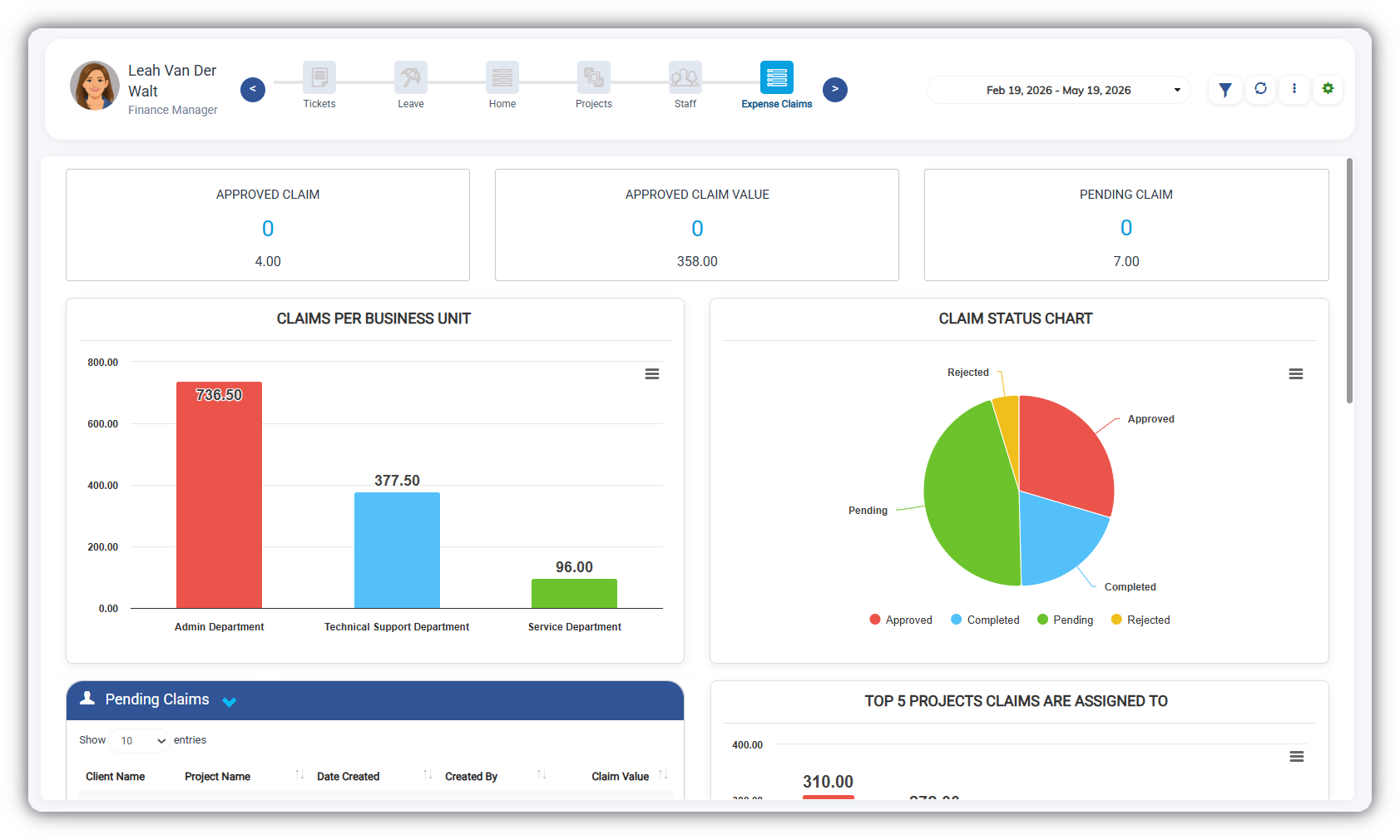
*Screenshots are illustrative only, contain fictitious data, and may differ from the current interface as the system evolves.
Clear insight into expenses across your business
Track expenses in real time with structured data linked to projects, employees, and cost categories.
You can track
- Expenses by project, client, or department
- Spend by employee, category, and billing status
- Approval status and reimbursement progress
Why it matters
-
Identify cost overruns early
-
Improve project profitability and cost recovery
-
Reduce manual reporting and reconciliation effort
Connected Ecosystem
Works with the systems that manage your operations
Expense claims connect directly with other Fusion modules to keep data aligned across your business.
Integrate with external accounting, ERP, and payment systems to extend your financial workflows beyond Fusion.
Common module combinations include:
- Projects & Timesheets – Link expenses to projects for accurate cost tracking and recovery
- Accounting & Finance – Push approved expenses into financial records for reconciliation
- Human Resources – Align claims with employee records and reimbursement processes
- Jobs & Field Services – Allocate on-site expenses to jobs for accurate costing
Keep your financial and operational data connected, consistent, and easy to manage.
Industries that benefit from Fusion Expense Claims
Configurable to different operational environments
Expense management needs vary across industries, but the requirement for control, accuracy, and visibility remains the same.
Any business that needs structured expense tracking, project cost visibility, and controlled approvals will benefit.
Commonly used in
- Professional services
- Field service businesses
- Engineering and construction
- IT and technology companies
- Consulting firms
- Logistics and operations teams
Implementation & Support
Structured setup with real operational alignment
Expense Claims is configured around your approval rules, cost structures, and project requirements to ensure accurate tracking from day one.
How it works
Consultation
A consultant works with your team to confirm requirements, approval structures, and how expenses should link to projects and billing.
Business Requirements Specification (BRS)
We define scope, workflows, and rules to ensure alignment before configuration begins.
Configuration
The system is set up to match your claim types, approval levels, cost categories, and business rules.
Data import
We provide structured templates for expense-related data and perform the import based on defined formats.
Training and go-live
Your team is trained on claim submission, approvals, and tracking, with support through go-live.
Ongoing support
Ongoing assistance ensures your processes remain aligned as your business evolves.
A structured implementation ensures accurate expense control, faster adoption, and consistent processes from the start.
Who is Fusion Expense Claims for?
Designed for teams that need control, visibility, and structured expense processes
Fusion CRM is a good fit if you
- Manage employee expenses across projects or departments
- Need clear approval workflows with defined accountability
- Want visibility into spend by employee, project, or category
- Require billable vs non-billable expense tracking
- Are moving away from manual or email-based processes
It may not be a fit if you
- Only process very low volumes of simple expenses
- Do not require approvals or structured controls
- Prefer fully manual or offline processes
Frequently asked questions
What is Fusion Expense Claims?
Fusion Expense Claims is a system for capturing, managing, and tracking employee expenses in a structured and controlled way.
It ensures all claims are recorded, supported with documentation, and processed through a defined approval workflow.
How do I submit an expense claim?
Expense claims are submitted directly in the system.
Users select the relevant expense type, enter details, and attach supporting documents. Claims are then routed automatically for approval based on company workflows.
Can receipts and supporting documents be uploaded?
Yes. Supporting documents such as receipts can be attached to each claim.
This ensures all required proof is stored with the claim and easily accessible for review or audit purposes.
Is it easy to capture claims on mobile?
Yes. Expense claims can be captured via the web system or mobile app.
The mobile app allows users to take photos of receipts and upload them instantly, making it easier to submit claims while on the move.
Does the system guide what can be claimed?
Yes. The system is configured to align with company policies.
Users are guided during submission, with only valid expense types and required fields available. This reduces errors and ensures compliance.
What happens if a claim is rejected?
Rejected claims include feedback or comments.
Users can review the feedback, make corrections, and resubmit the claim where necessary.
Is there visibility over past claims?
Yes. All submitted claims are stored in a searchable history.
Users can view previous claims, statuses, and supporting documents at any time.
Does the system support audit and reporting?
Yes. Every claim includes a full audit trail.
This supports reporting, transparency, and compliance, while giving management clear visibility into expense activity.
Take control of your expense processes
Capture, approve, and track expenses with clarity, structure, and full visibility across your business.
- Reduce delays in submission and approval
- Improve accuracy and cost control
- Gain clear insight into spend across projects and teams
Fusion Software also offers these services


Trusted by these companies


