

Tickets & Helpdesk
Manage tickets, communication, and resolution in one clear system. Fusion Tickets & Helpdesk helps your team log issues, assign ownership, track progress, and keep clients informed without losing visibility or control.
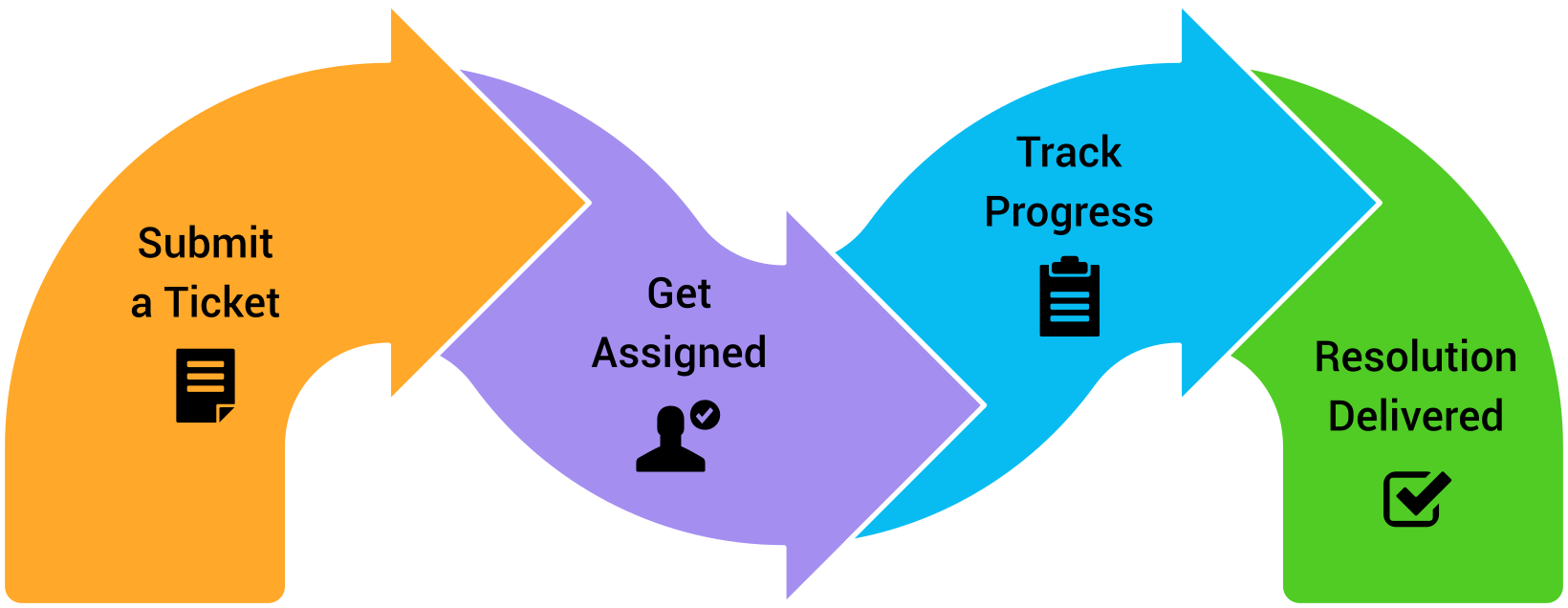
Why Ticketing & Helpdesk systems break down
Common Pain Points
- Requests come in from multiple channels with no central control
- Tickets are assigned informally, leading to confusion and delays
- Status updates are inconsistent or not tracked at all
- Communication with clients is scattered across inboxes
- No clear audit trail of what happened and when
- Managers lack visibility into workload and response time
- No reporting on ticket resolutions
Most helpdesk systems capture tickets, but fail to create accountability.
As volume increases, teams rely on inboxes, notes, or informal processes to manage support. Ownership becomes unclear, updates are missed, and response times slip. Without a structured workflow, it becomes difficult to track progress or maintain consistent service, resulting in client frustration.
How Fusion Tickets & Helpdesk optimises real support workflows

Capture and log support requests
All support requests are captured in a structured way.
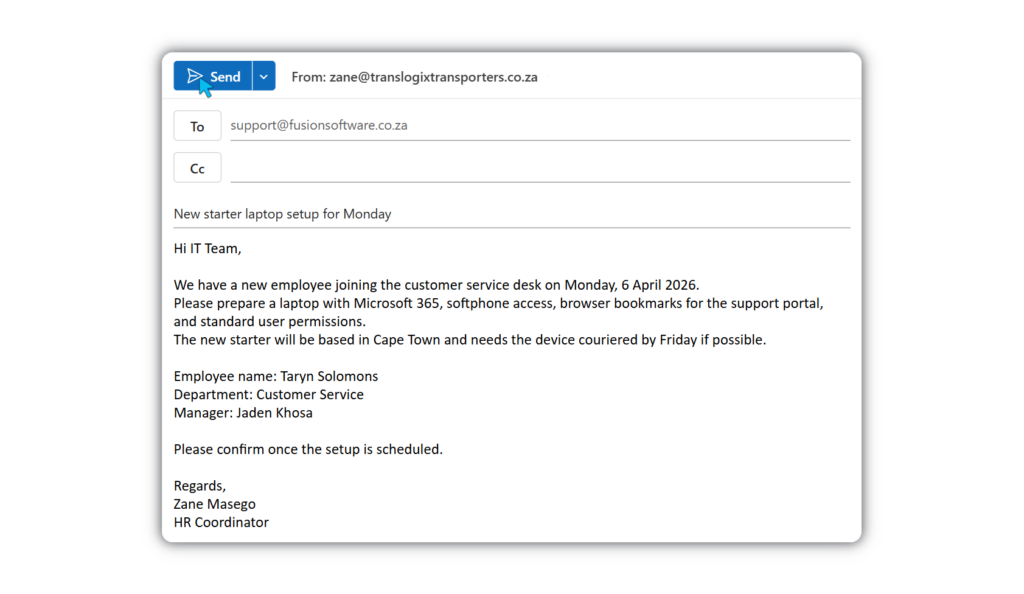
Tickets can be created manually or automatically from incoming emails, using a designated email address. This ensures every request is recorded consistently from the start.
How it helps
- Converts emails into trackable tickets automatically
- Centralises all requests in one system
- Standardises how issues are logged
- Reduces reliance on inboxes
Outcome: Every request is captured and ready for action.

Assign ownership and manage progress
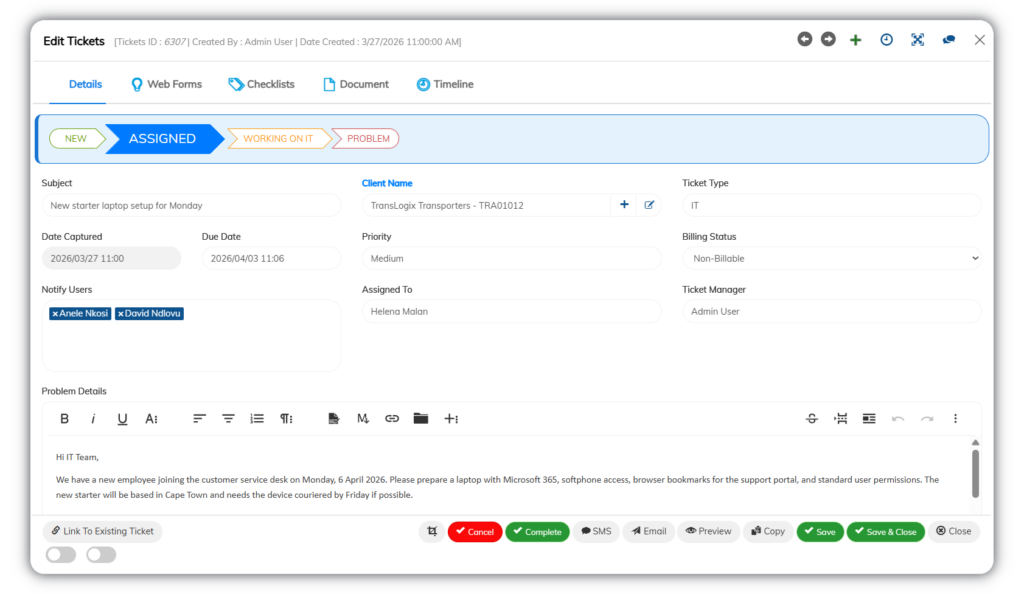
Each ticket is assigned to a responsible owner and tracked through defined stages.
Statuses and categories can be configured to match your internal processes, keeping work organised and moving.
How it helps
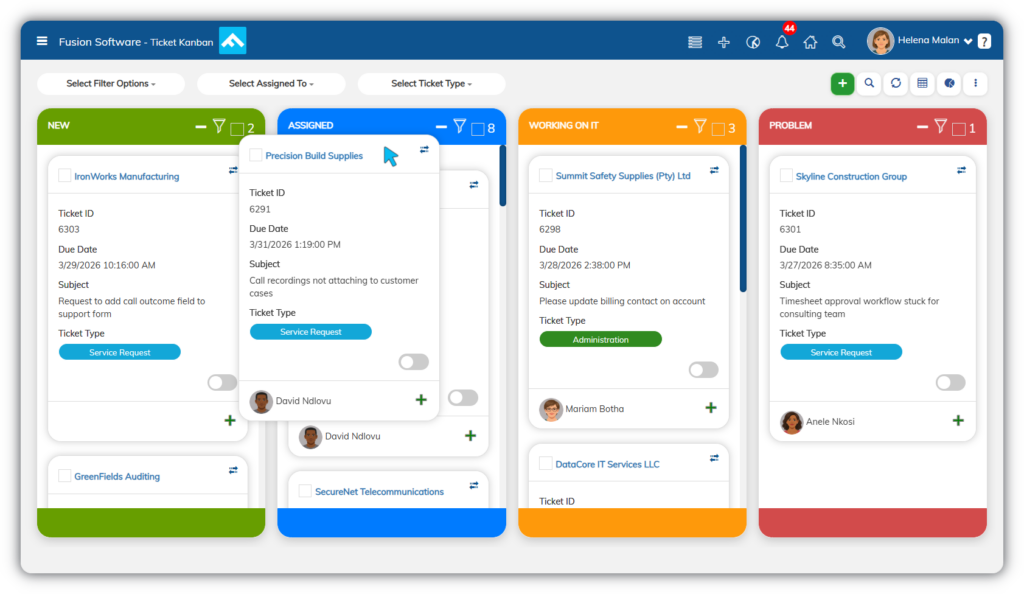
- Assigns clear responsibility for each ticket
- Tracks progress with configurable statuses
- Categorises issues for better control
- Keeps stakeholders informed without confusion through reporting
Outcome: Tickets move forward with clear ownership and control.

Track activity and manage communication
All actions and communications are recorded within the ticket.
Teams can add notes, follow guided checklists, and communicate with clients directly, while maintaining a full history of changes.
How it helps
- Logs all updates in a visible timeline
- Stores detailed notes and resolution steps
- Sends and tracks client communication from the ticket
- Supports consistent resolution through checklists
Outcome: Every interaction is visible, traceable, and accountable.
Core Tickets & Helpdesk capabilities
Structured tools to manage requests, ownership, and resolution
Designed to support real support workflows, not just ticket logging.
- Ticket Management
- Assignment & Accountability
- Activity Tracking & Communication
- Resolution & Workflow Support
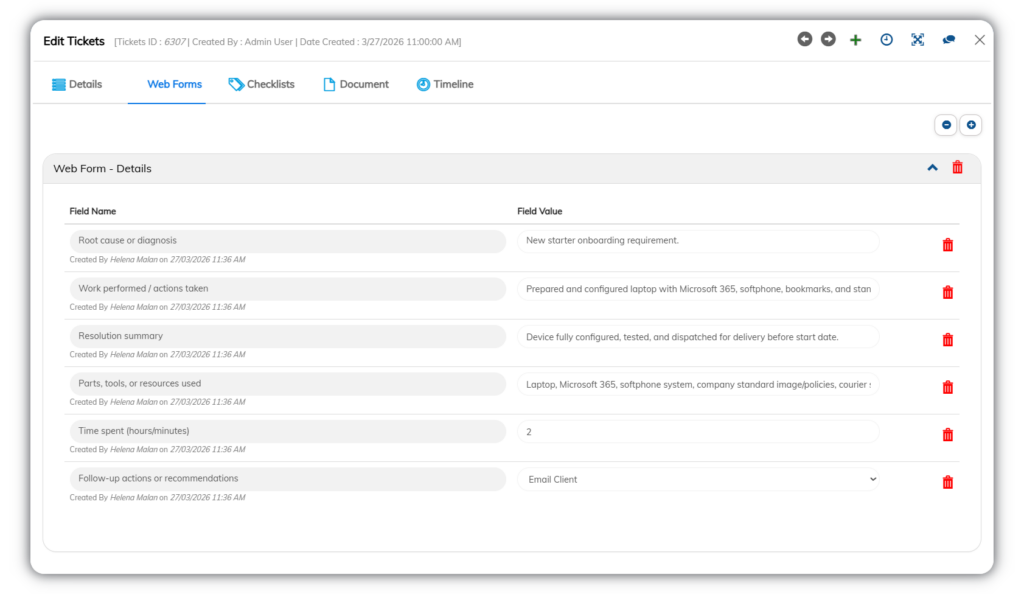
Ticket Management
Capture, organise, and control every support request in one place.
- Manual and email-based ticket creation
- Configurable status workflows
- Problem type categorisation
- Centralised ticket records
- Smart detail capture with notes
*Screenshots are illustrative only, contain fictitious data, and may differ from the current interface as the system evolves.
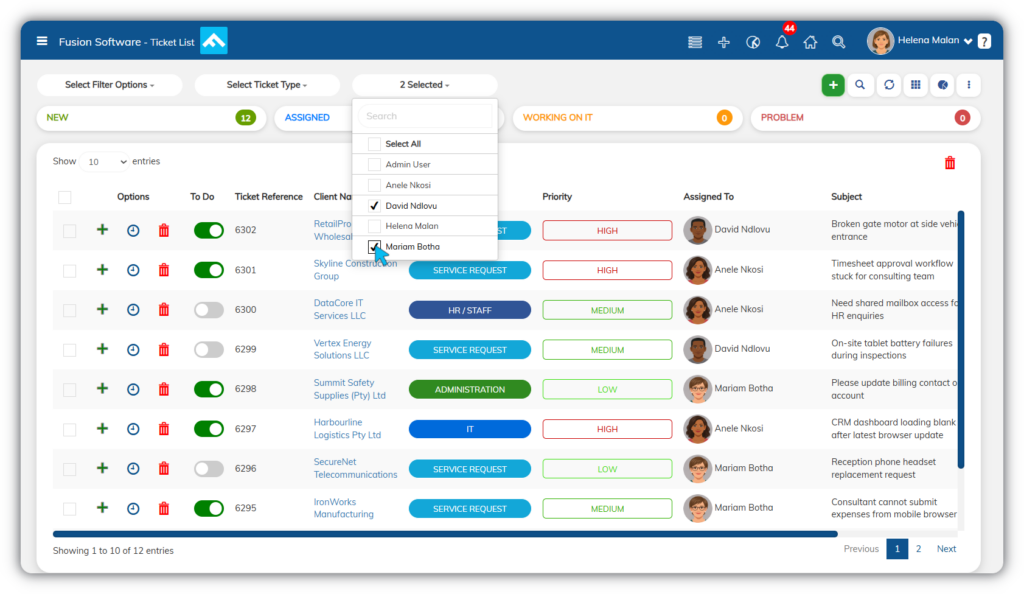
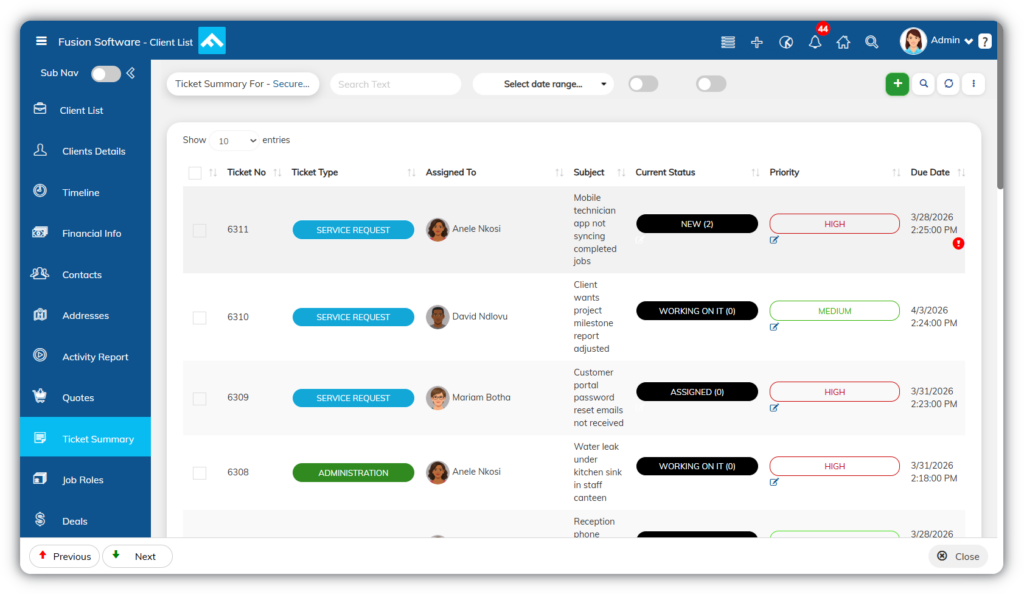
Assignment & Accountability
Ensure every ticket has clear ownership and visibility.
- Single owner assignment per ticket
- Notify additional stakeholders without reassigning
- Clear responsibility tracking
- Workload visibility across users
*Screenshots are illustrative only, contain fictitious data, and may differ from the current interface as the system evolves.
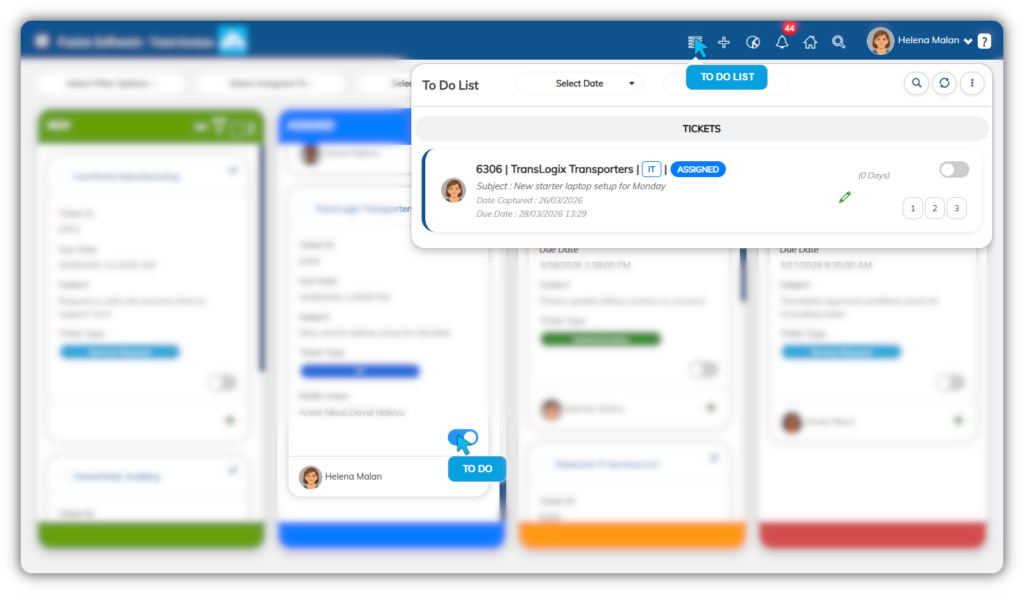
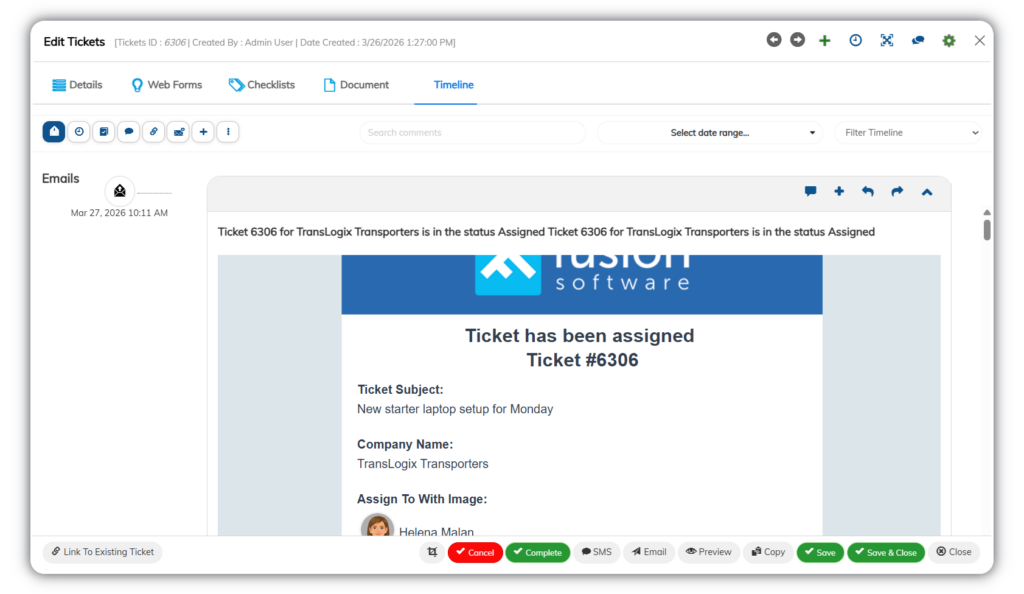
Activity Tracking & Communication
Keep all actions and communication in one place.
- Full activity timeline for each ticket
- Email communication logged against tickets
- Internal notes and updates
- Audit trail of all changes
- Centralised interaction history
*Screenshots are illustrative only, contain fictitious data, and may differ from the current interface as the system evolves.
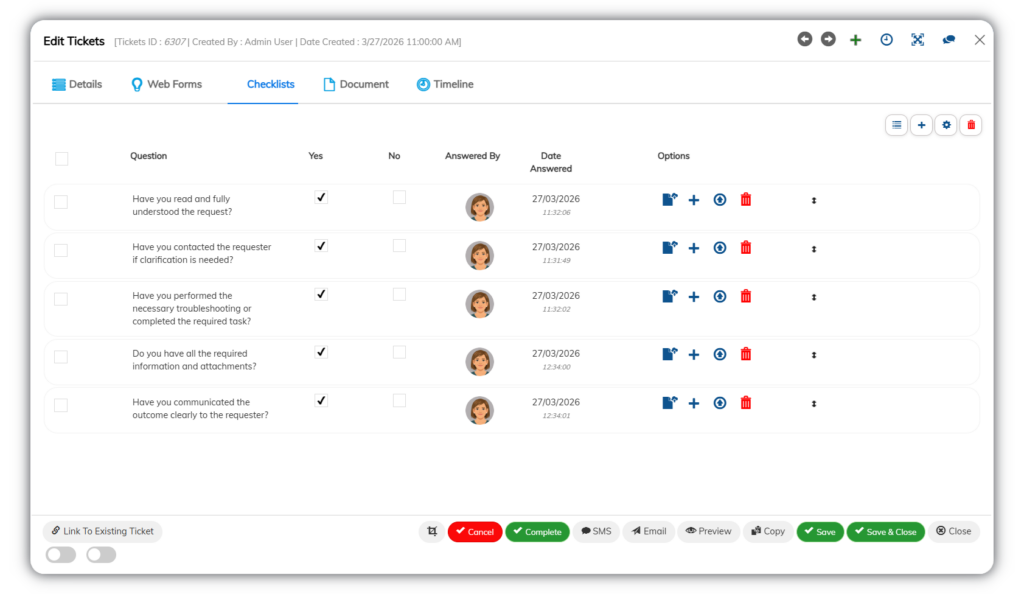
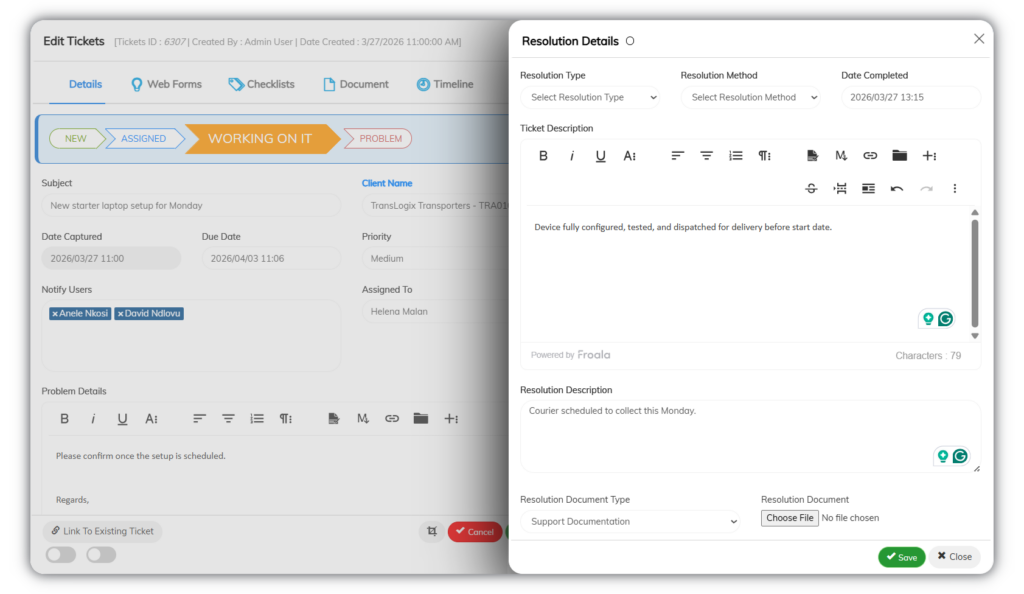
Resolution & Workflow Support
Guide consistent handling and resolution of issues.
- Checklist-driven resolution steps
- Configurable workflows per process
- Structured handling across teams
- Support for different issue types
- Consistent resolution approach
*Screenshots are illustrative only, contain fictitious data, and may differ from the current interface as the system evolves.
Reporting and Visibility
*Screenshots are illustrative only, contain fictitious data, and may differ from the current interface as the system evolves.
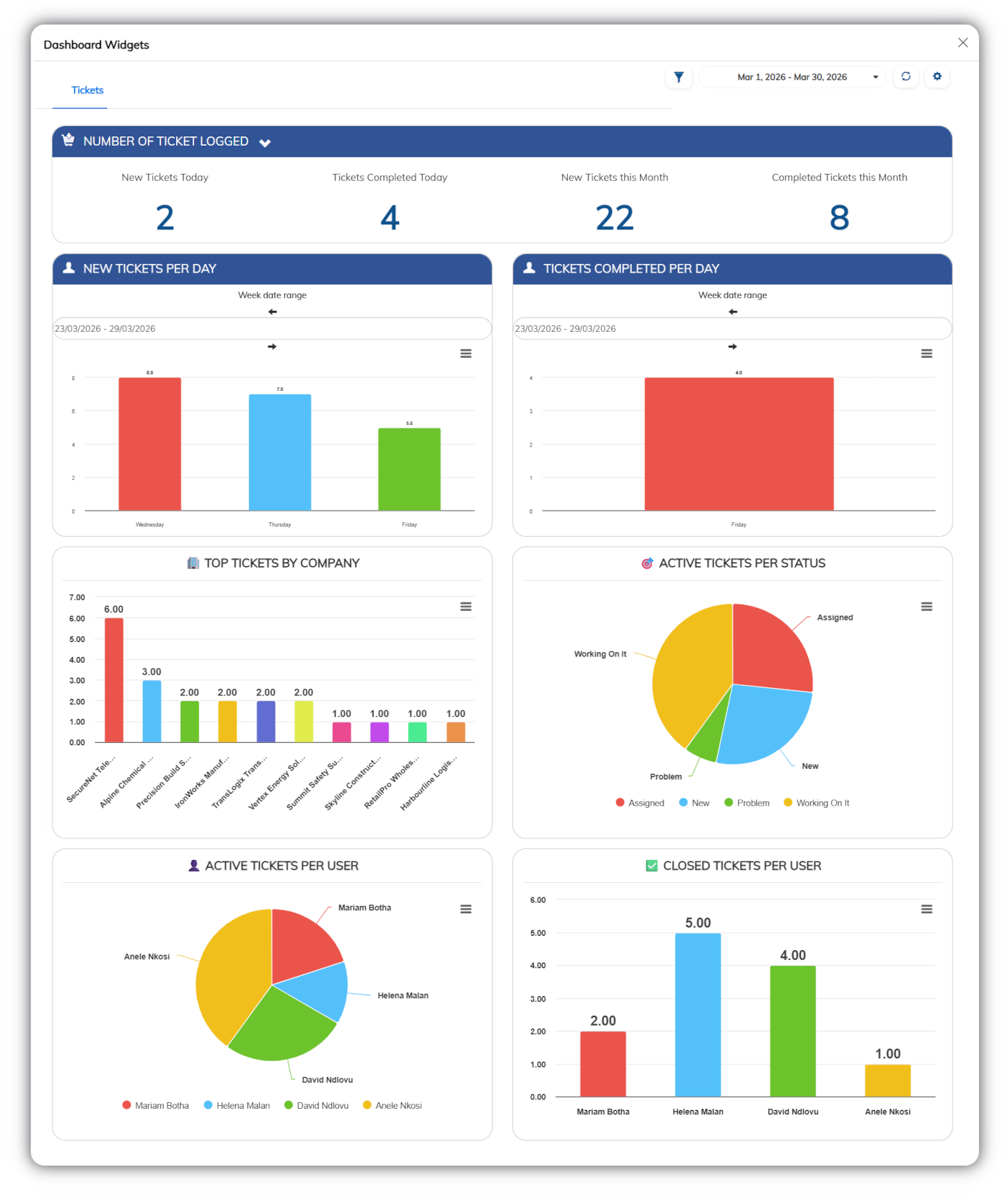
See what’s happening across your support function in real time
Track ticket flow, team activity, and response performance without manual reporting.
Fusion gives you a clear view of workload, progress, and service levels.
You can track
- Ticket volume by status or owner
- Response and resolution timelines
- Workload distribution across the team
Why it matters
- Identify bottlenecks early
- Improve response times and accountability
- Make informed operational decisions
Mobile Access
Manage tickets and stay updated from anywhere

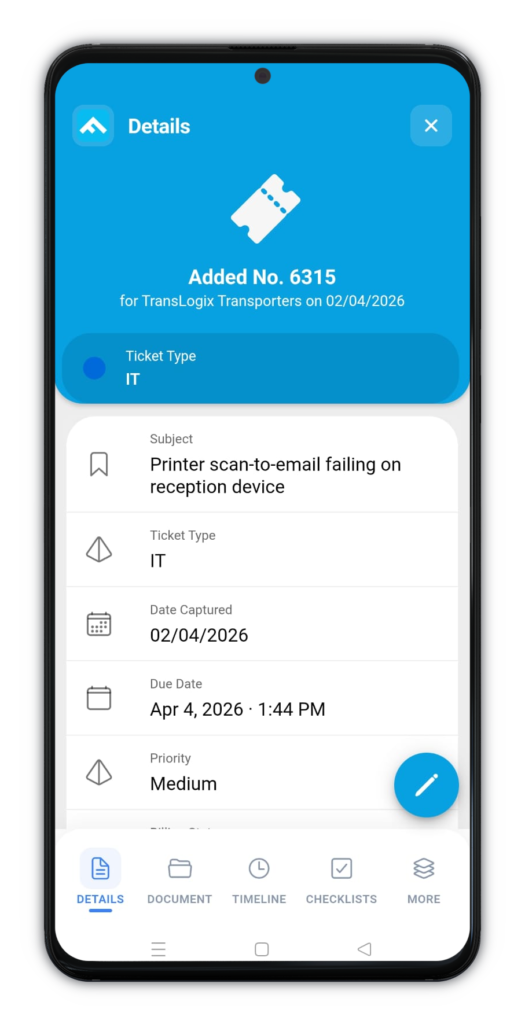
*Screenshots are illustrative only, contain fictitious data, and may differ from the current interface as the system evolves.
Support work doesn’t stop at the desk.
Fusion Tickets & Helpdesk allows your team to view, update, and manage tickets on mobile, keeping response times consistent even when on the move.
- View and update assigned tickets
- Change status and add notes in real time
- Track activity and ticket history
- Receive updates and notifications
- Stay aligned with team workflows
- Maintain visibility outside the office
Connected ecosystem
Extend support into your broader operations
Tickets don’t exist in isolation.
Fusion connects your helpdesk to the systems where work actually gets done.
This ensures issues move seamlessly into the right process without duplication or manual handover.
Common module combinations include:
- Projects & Timesheets – Convert tickets into tracked project work
- Jobs & Field Service – Escalate issues into scheduled on-site tasks
- Accounting – Link tickets to timesheets and bill from those timesheets
- CRM & Sales – Connect tickets to customer records for full context
Support becomes part of a connected workflow, not a separate process.
Industries that benefit from Fusion Tickets & Helpdesk
Configurable to fit different support environments
Fusion Tickets & Helpdesk adapts to how different teams manage requests, issues, and internal support processes.
Commonly used in
- IT and technical support
- Facilities and maintenance
- Field service operations
- Professional services
- Internal IT and HR support
- Customer service teams
Best suited for organisations that require structured workflows, clear ownership, and visibility across support activity.
Implementation and onboarding
Structured setup aligned to your support workflows
A clear implementation approach ensures your helpdesk is configured correctly from the start, with minimal disruption to your team.
How it works
Consultation
A sales consultant meets with your decision-makers to define requirements, scope, and confirm fit before the project begins.
Business Requirements Specification (BRS)
Once approved, we create a BRS that documents your workflows, ticket lifecycle, and configuration scope before setup begins.
Configuration around your workflows
Fusion Tickets & Helpdesk is configured to match your ticket statuses, categories, ownership rules, and workflows.
Data import and system setup
We provide structured templates for tickets and related data, and perform the import and set up accordingly.
Workshops, training, and go-live support
We run workshops with your team, provide focused training on real ticket workflows to ensure confident adoption from day one.
Ongoing support
After launch, ongoing support ensures your helpdesk continues to operate effectively as your needs evolve.
A structured rollout ensures your helpdesk is usable, aligned, and adopted from day one.
Who is Fusion Tickets & Helpdesk for?
Built for teams that need structure, visibility, and accountability in support
Fusion Tickets & Helpdesk is a good fit if you
- Manage ongoing support requests across email or multiple channels
- Need clear ownership for every ticket
- Require visibility into ticket status and team workload
- Want consistent processes for handling and resolving issues
- Need a full audit trail of actions and communication
It may not be a fit if you
- Only handle a very low volume of ad hoc requests
- Do not require structured workflows or tracking
- Prefer informal, inbox-based support processes
Frequently asked questions
What is Fusion Tickets & Helpdesk?
Fusion Tickets & Helpdesk is a centralised system for logging, tracking, and managing internal or customer support requests in one structured platform.
It replaces scattered emails and messages with a clear, trackable workflow.
What types of requests can be managed?
Fusion Tickets & Helpdesk can manage any type of request.
This includes IT issues, customer support queries, HR requests, and internal tasks. Categories and workflows can be configured to match your business processes.
How are tickets tracked and managed?
Each ticket is assigned a status and tracked through a defined workflow.
Statuses such as Open, In Progress, and Resolved provide clear visibility into progress. Ownership, updates, and activity are recorded in one place.
This ensures every request is managed consistently.
Are users or clients kept updated on ticket progress?
Yes. Ticket updates can be communicated automatically.
Notifications and updates are triggered based on your configured workflow stages. This keeps users or clients informed without manual follow-up.
Is there a history of past tickets?
Yes. All tickets are stored in a searchable history.
Each record includes actions, updates, and resolutions. This supports reporting, accountability, and continuous improvement.
How does the system improve support processes?
Fusion Tickets & Helpdesk improves support by adding structure and visibility.
Requests are centralised, tracked, and assigned clearly. This reduces missed requests, improves response consistency, and creates accountability across teams.
Take control of your support process
Bring structure, visibility, and accountability to every ticket from day one.
- Centralise all requests
- Assign clear ownership
- Track progress in real time
Fusion Software also offers these services


Trusted by these companies


